Power Quality Reference

The 10 Common Power Problems and Which UPS Topology Stops Each

Utility power fails in ten distinct ways, and the four UPS topologies address different subsets of them. That is a matching problem, not a ranking. The right topology is the one that covers the problems actually present on your circuit and tolerable to your load — which is often not the one that covers the most. This page defines each problem, names its usual cause, and maps every problem against every topology so you can make that call.

Problems defined
10
Topologies compared
4
Right answer
Depends on the load
Sizing help
800.582.4524

Definitions

Which power problems are affecting your systems?

Few sites see all ten. Most see two or three, determined by the utility feed, the building wiring, and what else is running on the circuit. Identifying which ones you have is the whole job — everything after that follows from it.

  • AC Blackout waveform

    1AC Blackout

    A total loss of utility power lasting more than two cycles.

    Typical cause: Utility failure, tripped breaker, or a fault upstream of the facility.

  • Power Sag waveform

    2Power Sag

    Short-term low voltage lasting from a few cycles to a few seconds.

    Typical cause: Inrush current from large equipment starting, utility switching, or a temporary overload.

  • Voltage Surge waveform

    3Voltage Surge

    Short-term high voltage above 110% of nominal, lasting several cycles.

    Typical cause: Large loads switching off, or utility capacitor-bank switching.

  • Brownout waveform

    4Brownout

    Reduced line voltage sustained for minutes to days.

    Typical cause: Utility load shedding during peak demand, or an undersized service feeding the building.

  • Overvoltage waveform

    5Overvoltage

    Increased line voltage sustained for minutes to days.

    Typical cause: Incorrect transformer tap settings, or a lightly loaded utility circuit.

  • Normal Mode Noise waveform

    6Normal Mode Noise

    High-frequency interference riding on the waveform between line (L) and neutral (N).

    Typical cause: RFI and EMI from nearby radio, motor, or switching equipment.

  • Frequency Variation waveform

    7Frequency Variation

    A shift away from nominal 60 Hz or 50 Hz.

    Typical cause: Operation from engine generators, which vary frequency as load changes.

  • Switching Transient waveform

    8Switching Transient

    A fast, high-voltage spike of very short duration.

    Typical cause: Load switching, capacitor-bank operation, or nearby lightning activity.

  • Harmonic Distortion waveform

    9Harmonic Distortion

    Distortion of the sine waveform by multiples of the fundamental frequency.

    Typical cause: Nonlinear loads such as rectifiers, switch-mode power supplies, and variable frequency drives.

  • Common Mode Noise waveform

    10Common Mode Noise

    Interference measured between ground and either neutral (N) or line (L).

    Typical cause: Ground loops, shared neutrals, and grounding faults in the building wiring.

Coverage

Standby vs. line interactive vs. online: what each topology protects against

Topology, not capacity, determines which problems a UPS can correct. A 10 kVA standby UPS still addresses only three of the ten. Read the table across your own problems, not down the columns looking for the most check marks.

Power problem coverage by UPS topology. A check mark indicates the topology corrects or blocks that condition.
Power problem Standby Line Interactive Online Double-Conversion Isolated Online
AC Blackout Protected Protected Protected Protected
Power Sag Protected Protected Protected Protected
Voltage Surge Protected Protected Protected Protected
Brownout Not protected Protected Protected Protected
Overvoltage Not protected Protected Protected Protected
Normal Mode Noise Not protected Not protected Protected Protected
Frequency Variation Not protected Not protected Protected Protected
Switching Transient Not protected Not protected Protected Protected
Harmonic Distortion Not protected Not protected Protected Protected
Common Mode Noise Not protected Not protected Not protected Protected

Online coverage assumes the unit is running in double-conversion mode. Most online UPS also offer an ECO mode, which is a configuration setting rather than a different product — see below.

More coverage is not automatically better

Each step up the table buys protection you may not need, and it is not free. Double conversion costs efficiency, generates heat, and adds fans in places where fans are a liability. An isolation transformer adds weight, cabinet depth, and cost to solve one problem many sites do not have. Specifying above the load’s needs can create the failure you were trying to prevent; specifying below them causes nuisance transfers and early battery replacement. For a POS terminal on a clean circuit, the fit is a standby UPS, not the unit at the right edge of this table.

Selection

The four types of UPS, and which Xtreme Power models use each

Standby UPS

3 of 10 problems

The load runs on utility power until voltage leaves tolerance, then transfers to battery. Because it is not passed through conversion stages in normal operation, a standby UPS reaches efficiency the other topologies cannot, and does it with no inverter running and no fan turning.

Block diagram of the standby topology on outage only Utility Surge / EMI filter Transfer switch Load Battery Inverter
Standby: the load is fed from utility through a filter. The inverter and battery are idle until the transfer switch operates.
  • Up to 98% efficiency, and less waste heat in a sealed enclosure
  • Silent: no inverter hum, no fan
  • No voltage regulation, so it transfers to battery on every brownout

Topology and product tier are separate decisions. Xtreme Power builds standby UPS from economical desktop protection to TAA-compliant lithium rated for continuous operation at 50 °C.

Right fit: When the load tolerates a few milliseconds of transfer time and the circuit is clean — a single workstation, a kiosk, a POS lane, an edge device that needs to survive an outage. Also the only topology quiet enough for an occupied room: exam rooms, classrooms, conference rooms, reception desks.

Overkill or mismatch: When line voltage sags or swells regularly. The unit will transfer to battery every time, and you will be replacing batteries instead of solving the problem.

Economical standby

Straightforward outage protection for single workstations, POS terminals, and IP telephony on stable circuits.

Lithium standby — edge and industrial

LiFePO₄, TAA compliant, rated to 50 °C, 5-year warranty, wall, DIN-rail, or short-depth 1U mounting. For kiosks, signage, AV racks, IDF closets, and control panels.

Xtreme Power J60 lithium standby UPS on its wall-mount plate with output cords connected
The J60 lithium standby UPS — wall-mount or DIN-rail, LiFePO₄, rated to 50 °C.

Line Interactive UPS

5 of 10 problems

Adds automatic voltage regulation (AVR) to the standby design. AVR corrects sustained high and low line voltage using transformer taps, without drawing on the battery. On an unstable circuit that is the difference between a UPS that cycles its battery all day and one that does not.

Block diagram of the line interactive topology corrects voltage without battery Utility Filter + AVR (tap changer) Transfer switch Load Battery Inverter / charger
Line interactive: AVR corrects high and low voltage in the utility path, so the battery is only used for actual outages.
  • Adds brownout and overvoltage correction to standby coverage
  • Far fewer battery transfers, which extends battery service life

Right fit: When the circuit is unstable but the load is not exotic — branch offices, retail back-of-house, small network closets on older service.

Overkill or mismatch: When the load runs from a generator, or when noise and harmonics are the real complaint. AVR does nothing for either.

Line interactive models

Rack, tower, and wall-mount platforms with automatic voltage regulation, in 120 V and 208/230 V.

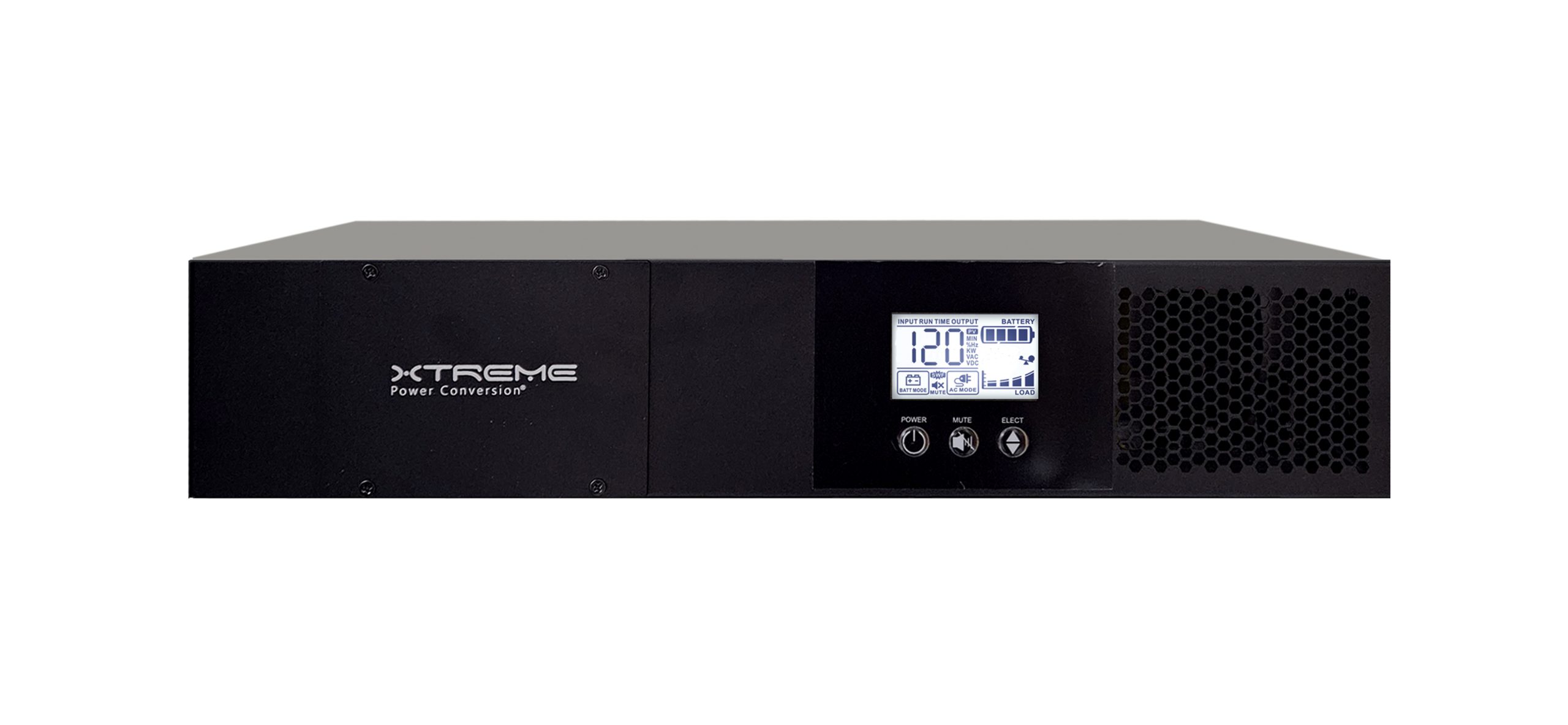
Xtreme Power V70 2U line interactive UPS, front view with LCD status display
The V70 line interactive UPS — rack, tower, or wall mount with automatic voltage regulation.

Online Double-Conversion UPS

9 of 10 problems

Converts incoming AC to DC and rebuilds it back to AC continuously. Because the output waveform is regenerated rather than passed through, it corrects noise, frequency, transients, and harmonic content as well as voltage. There is no transfer time, because the load never leaves the inverter.

Block diagram of the online topology DC bus static bypass (fault only) Utility Rectifier Inverter Load Battery
Online double-conversion: the load is fed continuously from the inverter, so the output waveform is rebuilt rather than passed through.
  • Adds normal mode noise, frequency variation, switching transients, and harmonic distortion protection
  • Accepts generator power without rejecting it as out of tolerance
  • Zero transfer time; the load runs from the inverter at all times

ECO mode changes the answer

In ECO mode the load is fed from filtered utility power with the inverter held ready rather than carrying it. Efficiency rises toward 99%, but the waveform is no longer rebuilt, so coverage drops to roughly line-interactive level and transfer time is no longer zero. Reasonable on a clean circuit feeding a tolerant load; wrong for a generator feed or an instrument. Confirm how a unit is configured before assuming it delivers the coverage above.

Right fit: When the load cannot tolerate transfer time, or when the power feeding it is genuinely dirty — generators, industrial floors, medical devices, anything with a rectifier front end nearby.

Overkill or mismatch: For a desk phone in a clean office. You will pay for conversion losses and fan noise to solve problems that are not occurring.

Lithium online

LiFePO₄ chemistry with up to ~15-year battery service life, faster recharge, and tolerance to elevated ambient temperature. From 1U rack units to three-phase cabinets.

Lead acid and modular online

Rack, tower, and modular platforms from 1 kVA single-phase through 700 kW three-phase, with N+1 module redundancy on the modular families.

Xtreme Power J90 1U online double-conversion lithium UPS, front view with color status display
The J90 online double-conversion lithium UPS — 1U, 1–1.5 kVA, rated to 50 °C.

Isolated Online UPS

10 of 10 problems

Also called a power-conditioned online UPS or laboratory-grade UPS. It adds a galvanic isolation transformer to the online topology, which separates the load from facility power entirely. That separation is the only way to address common mode noise, and it also gives the load its own derived neutral-to-ground bond.

In practice, common mode noise affects a narrow set of loads: analytical and laboratory instruments, mass spectrometers, electron microscopes, and similar equipment where the measurement noise floor is low enough that ground-referenced interference shows up in the data rather than in the power. For most equipment it is not a problem at all, which is why this topology is a specific answer rather than a general upgrade.

Block diagram of the isolated online topology DC bus breaks the ground path connect load directly here Utility Rectifier Inverter Isolation transformer Load Battery
Isolated online: a galvanic isolation transformer on the output breaks the ground path, which is what addresses common mode noise.
  • The only topology that addresses common mode noise
  • Establishes a separately derived source with a clean ground reference
  • Sized and specified around the instrument, not the room

Connect the instrument directly to the UPS output

Isolation is established at the transformer output and nowhere else. Feeding the load through a downstream PDU, power strip, or shared run reintroduces the ground paths the transformer was installed to break, and the benefit largely disappears. This is the most common reason an isolated installation fails to deliver — if the instrument cannot plug straight into the UPS, resolve that before specifying the unit. Our isolation UPS power quality guide covers grounding, separately derived sources, and how to confirm common mode noise is the actual problem.

Right fit: When grounding is the actual problem — shared neutrals, ground loops, sensitive instrumentation, or a load that needs its own separately derived source.

Overkill or mismatch: As a default upgrade. If common mode noise is not present, the transformer adds weight, depth, and cost for no measurable benefit.

Isolated online models

Online double-conversion with an integrated isolation transformer, 3.8–10 kVA at 240/120 V, standard and long-runtime.

Xtreme Power TX91 isolated online UPS tower, three-quarter front view with LCD status panel
The TX91 isolated online UPS — online double-conversion with an integrated isolation transformer.

Common questions

Power problems and UPS topology — frequently asked questions

What are the four types of UPS?

Standby, line interactive, online double-conversion, and isolated online. They differ in how the load is fed and how much of the waveform is rebuilt, which determines how many of the ten problems each corrects: 3, 5, 9, and 10 respectively. Capacity does not change this. A 10 kVA standby UPS still addresses only three.

Should I just buy the topology that covers all 10 problems?

Usually not. Coverage is a match, not a ranking. An isolated online UPS addresses common mode noise, and if that problem is not present at your site you are paying for weight, cabinet depth, conversion losses, and cost to solve nothing. The reverse error is just as expensive: putting a standby UPS on an unstable circuit means constant battery transfers and early battery replacement. Identify which of the ten problems you actually have, then pick the topology that covers those.

What is the difference between a standby UPS and a line-interactive UPS?

A line-interactive UPS adds automatic voltage regulation (AVR) to the standby design. AVR corrects sustained high and low line voltage without switching to battery, which is what lets it handle brownout and overvoltage. That is the difference between covering 3 problems and covering 5, and it also means far fewer battery transfers on an unstable circuit.

Is there any advantage to a standby UPS besides price?

Two that matter. Efficiency reaches up to 98%, because the load runs on utility power rather than through conversion stages, which means less waste heat and a lower running cost across a large edge deployment. And it is silent: no inverter hum and, on most models, no fan. That makes a standby UPS the only topology you can put in an exam room, a classroom, a conference room, or behind a reception desk without anyone noticing it is there.

When do I need an online double-conversion UPS?

When the load is sensitive to anything beyond voltage level. Online double-conversion rebuilds the output waveform from DC, so it also addresses normal mode noise, frequency variation, switching transients, and harmonic distortion. It is the standard choice for critical servers, phone systems, medical devices, and anything running from a generator.

What kind of equipment actually needs an isolated online UPS?

A narrower set than most people assume. Common mode noise is measured between ground and either neutral or line, and only matters when the load is sensitive enough to see it: analytical instruments, mass spectrometers, electron microscopes, and similar laboratory equipment, plus installations where grounding is compromised by shared neutrals or ground loops. An isolation transformer is the only thing that addresses it, and general IT equipment does not need one. One installation requirement matters: the load must connect directly to the UPS output, because a downstream PDU or power strip reintroduces the ground paths the transformer was installed to break.

Why does running from a generator change which UPS I need?

Engine generators vary output frequency as load changes. A standby or line-interactive UPS will often reject generator power as out of tolerance and run the load from battery until the battery is exhausted. An online double-conversion UPS regenerates the output frequency, so it accepts generator power and rides through the variation.

Does ECO mode change what an online UPS protects against?

Yes, substantially. In ECO mode the load is fed from filtered utility power with the inverter held ready rather than carrying the load. Efficiency rises toward 99%, but the output waveform is no longer being rebuilt, so protection drops to roughly line-interactive level and transfer time is no longer zero. That is a sensible trade on a clean circuit feeding a tolerant load, and the wrong setting for a generator-backed feed or an instrument. If a unit was specified for double conversion, confirm it is not sitting in ECO mode.

How do I tell which power problems are present at my site?

Symptoms are a useful first pass. Random reboots point toward sags and transients. Equipment that runs hot or fails early points toward sustained overvoltage. Network errors and audio hum point toward noise and grounding issues. A power-quality recording over several days will confirm it, and XPC can help interpret the results.

Not sure which of the ten you actually have?

Describe the symptoms and the site, and an XPC application engineer will help you narrow it down — including whether a power-quality recording is worth doing before you specify equipment.